
Inquiries & FAQ

FAQ

Please refer to the following content before making an inquiry *May be updated at any time

Oshikure is a browser game that controls real crane games online.

Using your Email address you can register using the 'Free Membership Registration' section shown on the TOP page and following the instructions. Your Email address will be used to contact you regarding inquiries. Please ensure your domain settings allow you to receive Email from '@mobacure.com'.
Further, users are restricted to one account per person.

We have restrictions on disposable Email addresses.
If your Email address is not disposable, then it may be that your domain settings have rejected the Email or that this address is already registered.
If neither of these are the case, please contact us using the inquiry form below.

  • 1 Play Tickets allow for one crane game play per ticket.
  • 1 Play Tickets have an expiry date. The date depends on the 1 play ticket.
  • Please confirm the number of 1 play tickets you have or their expiry dates on the 'ticket' screen via the menu.
  • Expired 1 play tickets will automatically be deleted.
  • Some prizes cannot be redeemed using 1 play tickets.
  • Since 1 play tickets are distributed, we cannot return them under any circumstances. Please wait for the next distribution.

1 Play Ticket expiration dates vary by type.
Also, please note that they may change depending on the time of year.
Users who have completed SMS verification will receive the total number of tickets that includes both the general distribution and the SMS-verified distribution.


  • Registration 1 play Tickets
    Number Distributed: 5 tickets (General)
    Date of Expiry:1 Days
  • Phone Number Registration 1 play Tickets
    Number Distributed: 2 tickets (SMS Verified)
    Date of Expiry:1 Days

(2026年10月13日時点)

The number of points needed for 1 play depends on the booth.
Please check the number of points that will be consumed.

The number of points awarded and the expiration date will vary depending on the type.
Also, please note that it may change depending on the time of year.


  • Login bonus points
    Date of Expiry:7 Days

  • Distributed points for events, etc.
    Date of Expiry:7 Days

  • Bonus points linked to point purchase / consumption
    Date of Expiry:7 Days

(2026年10月13日時点)

Choose your favourite prize from a wide selection.
The game will start when you press 'PLAY'. Aim for prizes using the 'Horizontal Button' → and the 'Vertical Button'. If the prize falls into the Get Zone then you have won it (There are a variety of other ways to play)

Please refer to the below.

<Currently booked>
  • If you move to another screen, or close the screen then your booking will be cancelled.
<During a play (From the game start display to the continue screen ending or win screen)>
  • After starting if you move to another screen or close the game, you will not be able to resume your game. (Since your points will also be consumed, if you wish for your points to be returned then please refrain from touching the controls and wait for the Time Over screen to be displayed. Please be careful after Game Start has been displayed.)
<Under maintenance (After a prize was won, or when a staff member has set it to the maintenance status)>
  • If the previous player wins a prize on a machine you have booked, it will temporarily be set to under maintenance, and your booking will be cancelled.
  • If an issue causes a staff member to set the machine to maintenance, then that machine's booking will be cancelled. (An alert will be issued)

Prizes for which the delivery address and other necessary information have been registered by midnight (AM 0:00) will be packed in order and shipped, and multiple requests will be packed together in a single cardboard box.
With regards to shipping procedures, we provide tracking numbers issued at the time of shipping slip creation by the shipping company meaning users can check the delivery status using the relevant shipping company's methods.
You can confirm the shipping number for each item by checking the bottom of the 'MY PAGE' and click the 'Shipping request / Win History', which will display the prize shipping history, and a tracking link for shipped prizes.
(There may be issues with delivery if your name, address or phone number have been registered incorrectly)
If you have filled in the profile via the 'Profile Renewal' button on 'MY PAGE' then you will not need to fill in this information each time.
If the delivery form has been filled out incorrectly, please contact us using the inquiries form in order to re-enter your address.
If the address is unknown, we will store the prize. (Prizes will be stored for up to 14 days from the date the prize is won.) Further, if you request shipping for multiple prizes to the same address, please use the batch entry.
Prizes can be batch shipped to the same address by checking the box on the left.

In rare cases, if the sensor that detects prize wins malfunctions the win screen may not appear.
Please be assured that we have saved photos of the booth at the start and end of the game to keep a record of play.
If you cannot see it in the won prizes list, please inform us via the inquiry form below.
If it is displayed in the won prizes list after this, please enter the shipping information from MY PAGE.

Please press the 'PLAY' button only once. Depending on the network environment, the response may be delayed.
'Continue playing' will be displayed in the centre of the screen, and you can select 'YES'.

If you press the 'PLAY' button several times in succession, it may cancel this and in some cases you will be unable to play other machines.
In cases where you cannot play several times in succession, please notify us via the inquiry form below.

If you proceed to MY PAGE ⇒ Shipment Requests / Win History ⇒ Shipping Status then an image from the front camera taken when you won the prize will be displayed, allowing you to check.

You can check via the 'Point history' on the Point Page. Point charges, points used during play, points granted, and point returns due to time overs and errors can all be confirmed here.

We will advise you to the best of our ability by replying to inquiries from the inquiry form below.
The easiest way to learn is by watching other players.

Please check the recommended PC environment, browser version and settings below.
If our system automatically determines that the camera is not functioning, it will automatically be restarted every 15 minutes and adjusted.
However, this only applies when no play actions have occurred, so if it stops working during gameplay please request a restart. Once the camera has been restored, you will restart from the point you left off.

Please try restarting the app / browser.
If 'Connection lost' continues to be displayed then please try restarting your browser.

If this doesn't solve the issue, then your connection may be unstable.
・Please check that your home internet is 100Mbps or above
・If using wifi then switching to a wired connection may improve the situation.
・Your provider may also be experiencing network congestion.
*If your connection is worse at particular times of day, this may be the case.

Please try from somewhere with a better connection, or try again at a different time.

If you remain on the play screen for an extended amount of time, the device may run out of memory.
Please try restarting the app or browser. (In the case of browser, try closing unused windows or tabs).

If this doesn't solve the issue, then your connection may be unstable.
・Please check that your home internet is 100Mbps or above
・If using wifi then switching to a wired connection may improve the situation.
・Your provider may also be experiencing network congestion.
*If your connection is worse at particular times of day, this may be the case.

Please try from somewhere with a better connection, or try again at a different time.

There is a continue function, so users who hold a larger number of points will be more likely to win prizes.
Depending on the popularity of the prize you choose, we advise planning ahead and charging your points in advance.

When charging points or making inquiries during play, there is a 90 second grace period per round (with some exceptions) so please move to the Charge Screen after starting play.
The way to do this is: End Play ⇒ Continue Playing ⇒ Yes ⇒ Start play (There are about 90 seconds before a time over) ⇒ Open the Charge Page ⇒ Charge ⇒ Return to play Screen (For Android, press the □ button and select the app currently playing to return).
Start playing and charge without making operations. The Play Screen and Charge Screen will be opened simultaneously. In this case, it will not return to the top screen. If you leave the booth, other players will be able to play it.
Further, the prize you were aiming for needs one play worth of points remaining. The number of points needed for one play will be used, and the process will be Start Play ⇒ Charge ⇒ Play used.
In this case, if the 90 second grace period is exceeded, use another Play Continue to get a further 90 seconds. While you will need to contact us via an inquiry, we will return the points used by the time over. The same applies to making inquiries during play.
Further, we recommend charging extra points. Please be aware that operation errors which lead to the right to play a booth being transferred will mean you may not be able to resume from the last play state.

Please make an inquiry before or during play. We cannot exchange prizes after you have won them.

When you fill in the shipping information for a prize, please add 'pick up at delivery office' or 'don't need a delivery slip' in the field for your name.
E.g. Last name: pick up at delivery office Smith
First name: John

If you wish to unsubscribe from the service,
please perform the unsubscribe procedure.

[ Notes ]

The points and 1 play tickets you hold will be deleted.

We cannot refund any points you have.

You cannot request for prizes to be shipped after withdrawing. If you have won any prizes, please be sure to submit the shipping request first.

If you are using login via SNS, please unlink it via each SNS.

This can be changed via Menu -> My Page -> Account Information.

If you cannot receive the SMS please check your contract and the settings below.

1.Your phone contract allows receiving SMS and you are using a mobile phone.
 *MMS are not able to be used.

2.You are able to receive messages from overseas phone numbers
*If you have selected to refuse messages from overseas numbers the SMS will not be delivered.
*The exact wording may change depending on the carrier.

[For docomo]
https://www.nttdocomo.co.jp/info/spam_mail/sms/

[For au]
https://www.au.com/support/service/mobile/trouble/mail/cmail/block/

[For SoftBank]
https://www.softbank.jp/mobile/support/mail/antispam/mms/fromoversea/

*In cases other than these, please check how to change the settings for that carrier.

If the settings have been changed, you will be able to receive the SMS after restarting your phone.
Please note this when confirming the settings.

This prize is delivered directly from the manufacturer or retailer. It is not possible to specify the date and time of delivery, and depending on the prize, shipping and delivery may take some time.
Further, it is not possible to track the delivery status of direct shipments.
Thank you for your understanding.

The 'Assist Meter' is a meter that accumulates as you play continuously.
When the meter reaches MAX, it will change to the 'Assist request' button, and you can ask the staff for help obtaining prizes.

You may have to wait up to about 5 minutes for an Assist request.
(Waiting time varies depending on how busy the store is)

After you make an Assist request, the booth will be a VIP booth exclusively for you for approx. 15 minutes. There is no need to queue again even if continuous play is interrupted.

Assist will end if a prize is obtained during an Assist request or if there is no play activity for a while.

'Digital Gift' is a service that can be exchanged for products at physical stores or online shops.
Digital Gift Usage Guide

The Mafin Digital Gift is subject to the terms of service of Mafin.
Mafin's Terms of Service

There is a 'Digital Gift' section in the menu.
The prize will be added after the win is confirmed. If it does not appear after winning, please contact us.

To redeem, use the QR code or barcode on the receipt screen to exchange for products at stores or online shops.
No app download or membership registration is required

The expiration date is set for each prize. Please check the 'Digital Gift' section for details.

We apologize, but expired gifts cannot be reissued. Please use the Digital Gift before the expiration date.

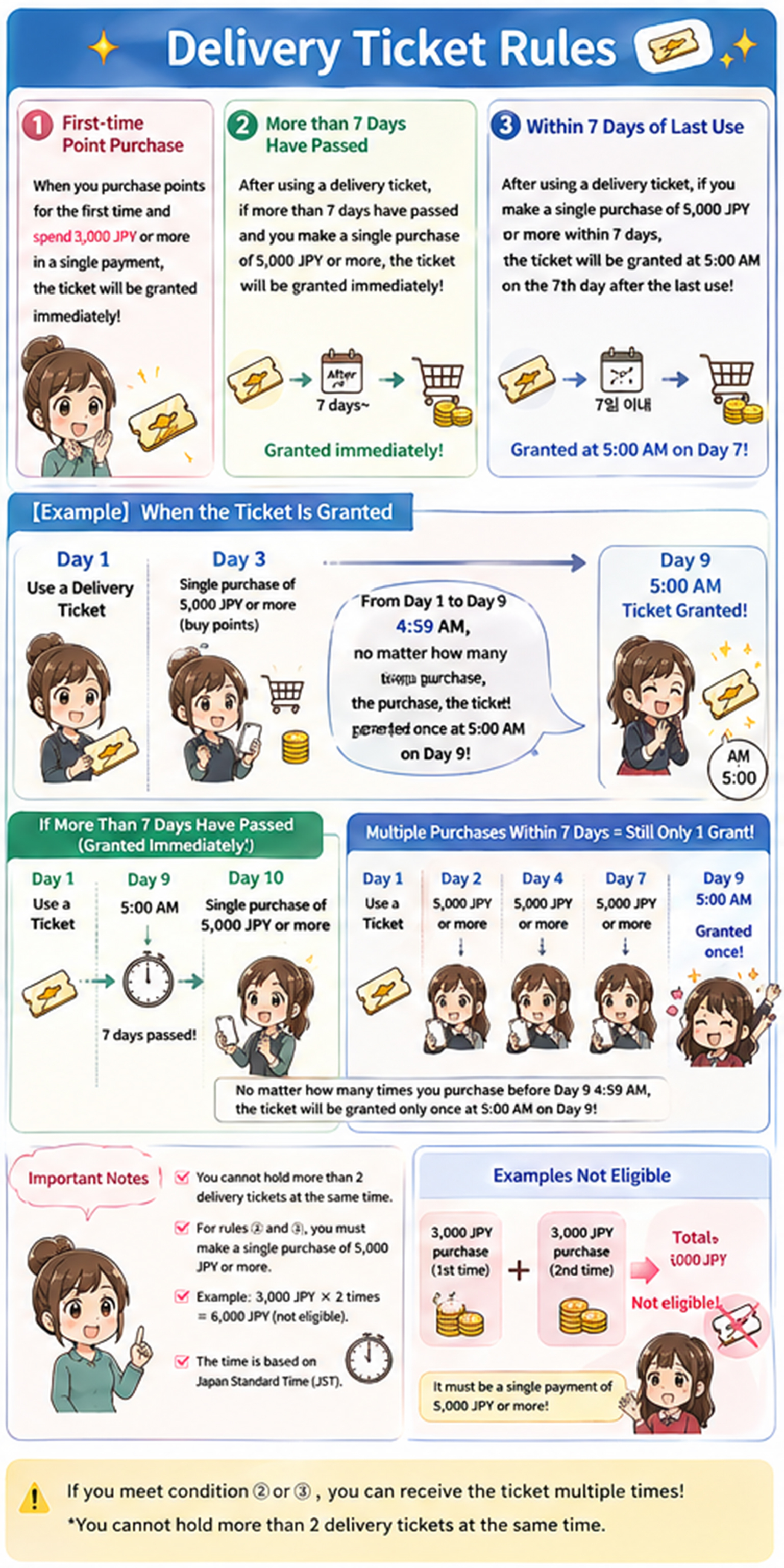
  • A shipping ticket provides one free shipment per ticket.
  • You can hold a maximum of one shipping ticket at a time; multiple tickets or rollovers are not allowed.
  • If you have a shipping ticket, it will be automatically used when you make a shipping request.

<If the delivery address is within Japan>
1.Instant distribution when making a payment of 500 yen or more at the first point purchase.
2.Instant distribution when making a point purchase of 3,000 yen or more after more than a week has passed since using the shipping ticket.
3.If a point purchase of 3,000 yen or more is made within one week after using the shipping ticket, the distribution will occur at 5:00 AM, 7 days after the previous use of the shipping ticket.

Example) Distribution timeline
Day 1: Shipping ticket used
Day 3: Points purchased with a payment of 3,000 yen or more
Day 9: Shipping ticket distributed (at 5:00 AM)
・No matter when or how many times you purchase points with a payment of 3,000 yen or more between using the shipping ticket on Day 1 and 4:59 AM on Day 9, the ticket will be distributed only once, at 5:00 AM on Day 9.
・If you make no purchases after Day 1 and then purchase points with a payment of 3,000 yen or more at or after 5:00 AM on Day 9, the ticket will be distributed immediately because 7 days have passed.
Further, after this, you can receive shipping tickets any number of times as long as conditions 2 and 3 above are met.
Note: You cannot possess more than one shipping ticket at the same time.
Note: Conditions 2 and 3 above apply only when a single payment of 3,000 yen or more is made for point purchase.
Note: If the total amount becomes 3,000 yen or more by cumulative purchases such as 1,000 yen × 3 times = 3,000 yen, it will not be eligible for distribution.

<If the delivery address is outside Japan>
1.Instant distribution when making a payment of 3,000 yen or more at the first point purchase.
2.Instant distribution when making a point purchase of 5,000 yen or more after more than a week has passed since using the shipping ticket.
3.If a point purchase of 5,000 yen or more is made within one week after using the shipping ticket, the distribution will occur at 5:00 AM, 7 days after the previous use of the shipping ticket.

Example) Distribution timeline
Day 1: Shipping ticket used
Day 3: Points purchased with a payment of 5,000 yen or more
Day 9: Shipping ticket distributed (at 5:00 AM)
・No matter when or how many times you purchase points with a payment of 5,000 yen or more between using the shipping ticket on Day 1 and 4:59 AM on Day 9, the ticket will be distributed only once, at 5:00 AM on Day 9.
・If you make no purchases after Day 1 and then purchase points with a payment of 5,000 yen or more at or after 5:00 AM on Day 9, the ticket will be distributed immediately because 7 days have passed.
Further, after this, you can receive shipping tickets any number of times as long as conditions 2 and 3 above are met.
Note: You cannot possess more than one shipping ticket at the same time.
Note: Conditions 2 and 3 above apply only when a single payment of 5,000 yen or more is made for point purchase.
Note: If the total amount becomes 5,000 yen or more by cumulative purchases such as 3,000 yen × 2 times = 6,000 yen, it will not be eligible for distribution.
Note: The time is in Japan Standard Time.About shipping tickets
« User PC »

Windows 7 or later
  • InternetExplorer version 11 or higher Edge version 40.15063.674.0 or higher
  • Firefox version 56.0.2 or more Chrome version 62.0.3202.75 or higher
Mac OS X or later
  • Safari version 8 or higher version 56.0.2 or more
  • Chrome version 62.0.3202.75 or higher
Internet Connection
  • *We recommend a wired fiber connection over 100Mbps, and playing at times when your connection is unlikely to be congested.

The PLAY screen may remain black without any images displayed depending on your security software, computer or network settings.
(Most users will not encounter this issue. Since we are unable to offer support for each user's security software, computer, OS or network settings,please direct inquiries to those providers.)

Inquiries

If the issue is not resolved by the above, please make an inquiry below after reading the terms of service and privacy policy
The content of the form will be relayed on-site via audio, so please include the machine number, prize name and other content with punctuation in between and in a single line. Further, we can refund points if there is an issue on a case by case basis, but there are some circumstances where we cannot reply to inquiries that go against the terms of use such as refunds etc.(Please consult with the payment company used when the inquiry relates to payments)

*...is a required item.

Please click 'Confirm' only after reading and agreeing to the terms of service and privacy policy.